Roofstock Broker Portal
Enterprise real estate Transaction Management System (TMS) that automates workflows to increase agent efficiency and scale transaction operations.
B2B
0-1
Web App
Real Estate
Industry
Real Estate
Duration
3 months
Responsibilities
Contextual Inquiry & Workflow
Data-Driven IA & Prioritization
Scalable Pattern Development
Rapid Prototyping
Usability Testing
Quality Assurance
Team
1x Product Designer
1x Product Manager
5x Engineers
2x Business Development
1x Legal Partner
Overview
Business Context & Opportunity
Rising rates created a revenue growth opportunity
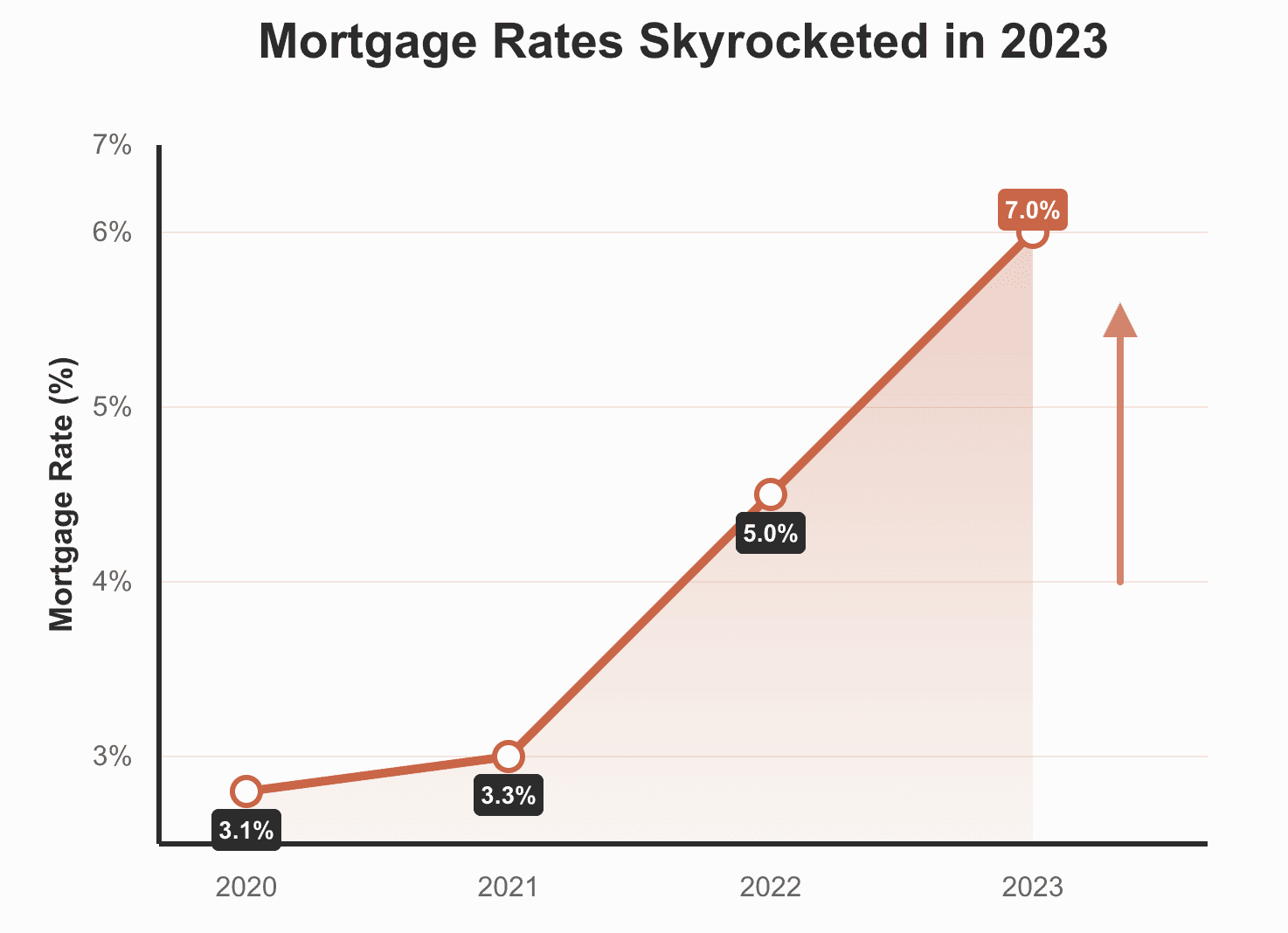
Roofstock helps institutional investors buy, sell, and manage single-family rentals at scale. As mortgage rates rose in the post-pandemic environment, investors shifted from buying to selling. Roofstock recognized this as a strategic revenue opportunity and launched an initiative to build a tool that would support scaling its sell-side operations.
Impact
📈
Investors pivoted to selling—volume surged
Opportunity
💡
Scale sell-side business
Solution & Impact
The Results & Impact
Launched broker portal, an enterprise system that boosted efficiency
Before
Disjointed tools, scattered info, repeated work, low efficiency.
After
Broker Portal
Dashboard
Properties
Weekly Report
Offers
Resources
Collapse
One automated workflow, clear status, faster execution, happy agents.
54%
Reducing task completion time
38%
Reduction in Compliance time
Scaled Operations without Adding Headcount
Design solution
Transactions & Tasks Overview — Dashboard shows urgent tasks; Property page shows all transactions.
Single Source of Truth — Property Summary centralizes details, transactions, progress, and documents.
Task Completion Workflow — Proactively guides agents through each step, reduces errors, and increases confidence.
Research & Insight
What are the users’ pain points?
Uncovering agents’ daily struggles
Together with the PM, we interviewed six agents and three stakeholders. This process helped us see the bigger picture, understand the realities of an agent’s day, and identify key pain points and opportunities for improvement.
My workflow feels all over the place
"With 10+ deals going at once, I’m drowning in tabs just trying to keep track of everything.”
I waste so much time doing tasks
“I'd capture property details on paper on-site, then spend hours re-entering everything into the system.”
I never feel confident about where my deals stand
“Scattered updates across forms/emails make it hard for me to track deal progress and find urgent tasks.”
What’s the root cause?
Mapping the end-to-end workflow to identify systemic problems
Mapping the workflow revealed a deeper issue: agents were struggling due to systemic fragmentation across the entire process. By identifying the causes of delays in each operational step, I uncovered clear opportunities for us to streamline the workflow and solve the underlying problems.
Workflow
Step 1 — Onboarding & Assignment
Step 2 — BPO Completion
Step 3 — BPO & Price Review
Step 4 — Listing
Step 5 — Weekly Report
Step 6 — Offer Management
Step 7 — Transaction & Closing
Problems
Information Silos, No Centralized Workflow
Manual Data Entry, Fragmented Tools
No Workflow Visibility, No Status Updates
Manual Data Entry
No Automated Notifications, Manual, Repetitive Work
No Centralized Workflow, No Task Prioritization
Fragmented Tools, Compliance Not Enforced
Multiple Tools Used






Product Strategy
Defining a clear direction
Synthesizing business goals and user pain points into product strategies
I collaborated with the PM and business development team to synthesize business goals and user problems, and we aligned on three core product strategy pillars:
1. Clarity - provide a single source of truth that clearly shows deal, task, and workflow progress.
2. Prioritization - surface urgent tasks and blockers to prevent delays and reduce compliance issues.
3. Direction - show the required tasks and guide agents through tasks in a clear, structured workflow.
Scale volume without adding headcount
Shorten time to close
Standardize workflows
Reduce compliance workload
Business Goals:
What's the deal status?
What's next?
What needs attention?
User Problems
Clarity
Prioritization
Direction
Product Strategies
Design Strategy
Designing for
Clarity
Aligning the IA to the agent’s mental model
Deal information was scattered across multiple tools, so achieving Clarity started with designing the IA—not the UI.
Our team explored two IA directions: a task-driven system or a property-driven system. User research showed that agents think property-first, and competitive analysis revealed that most workflow platforms anchor around an entity because it provides the most stable decision-making context.
With this alignment, we adopted a property-driven IA that matches the agent's mental model. This ensures agents always know where they are, what they’re viewing, and how each action connects to the overall deal.
Task-driven IA
Tasks
Task 1
Task 2
Task 3
Property A
Property B
Property A
Property C
Property D
Property E
Pro: Batch similar tasks, efficient
Con: Unfamiliar pattern
Property-driven IA
Selected
Properties
Property 1
Property 2
Property 3
Overview
Pre-Listing
On Market
Offers
Under Contract
Documents
…
…
Pro: Matches mental model, familiar pattern
Con: Buries tasks
Competative Analysis
User Testing
From scattered information to a single source of truth
Problem
My workflow feels all over the place
"With 10+ deals going at once, I’m drowning in tabs just trying to keep track of everything.”
Solution
All essential deal components—tasks, property details, documents, offers, and compliance items—are consolidated into a single, clear source of truth: the Property Summary page.
Property Summary
3
M

Task Tracker
Pre-Listing
2
On Market
Enter MLS Listing Details
Completed
Weekly Activity Report
Due: Aug 14, 2025
Requested
You must submit activity for all of your listed properties. If you’re missing data for one or more properties, you can save and return later to complete the report.
Submit
Submit Price Reduction Recommendation
Optional
3
Offers
Submit Offer
Draft Purchase and Sale Agreement
Finalize Purchase and Sale Agreement
4
Under Contract
Confirm EMD Received
Submit Inspection Information
Submit Appraisal Information
Remove Contingencies
Prepare for Closing
5
Close
Disburse Funds
Property Details
Property Type
Single Family
Market
Maricopa
Community
Laredo
Lot Size (sq ft)
6,678
HOA (Annual)
$1,429
Occupancy & Access
Contacts

Emma Miller
Disposition Manager
emma.miller@roofstock.com
(939) 439-9098

Maria Martinez
Agent
sarah.martinez@homesaz.com
(939) 439-9098

Daniel Lee
Transaction Coordinator
daniel.lee@roofstock.com
(939) 439-9098
A stage-based task tracker provides clear visibility into progress and upcoming tasks.
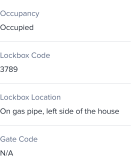
The right-side Property Details panel centralizes key details, occupancy & access, and contact information.
Pre-Listing
On-Market
Under Contract
Closed
Property Status Indicator shows where the deal stands.
Requested
In Review
Challenged
Completed
Overdue
Color-coded status pills provide instant visibility into task progress.
Property Summary page - Single source of truth
Designing for
Prioritization
Designing a dashboard that surfaces what matters most
Agents weren’t struggling because they didn’t know how to do their jobs—they struggled because they couldn’t see what needed their attention first.
To solve this, I designed a dashboard with a prioritization system that surfaces urgent tasks, highlights blockers, and makes the most important work impossible to miss.
Choosing a Layout That Makes Priorities Clear at a Glance
Table View
Deal Metrics
Transactions
Pro: Dense information
Con: Overwhelming for scanning priorities
Design Team Feedback
List View
Deal Metrics
Transactions
Pro: Clean, less overwhelming than table
Con: Requires more scrolling
Design Team Feedback
Kanban View
Deal Metrics
Pre Listing
On Market
Under Contract
Pro: Good for status tracking
Con: Takes longer to develop.
Technical Constraints
Card View
Selected
Deal Metrics
Transactions
On Market
Under Contract
Scannable cards with key metrics and actions at-a-glance. Balances information density with visual clarity.
Engineering Feasibility
Internal Alignment
Designing property cards that deliver context and prioritization at a glance
To reduce “click-to-check” behavior and improve prioritization at scale, I designed the property card to surface essential context at a glance, including high-visibility deadline pills like Overdue, Due Today, and Due Tomorrow.
These urgency signals, paired with key property details, turn each card into a self-contained prioritization unit—helping agents quickly scan their deals, spot what needs attention first, and take action without opening every property.
Version 1
Revise BPO
Due Today
7436 N Painted Sky Way, Glendale, AZ, 85383
On Market
Agents have strong mental models organized around properties, not tasks.
User Testing Feedback
Version 2
7436 N Painted Sky Way
Glendale, AZ, 85383
On Market
Revise BPO
Due Today
Observed that agents were still clicking into cards to get basic context. Show key property data on the card so agents don't have to open every deal to get context.
PM Feedback
7436 N Painted Sky Way
Glendale, AZ, 85383
On Market
Listing Price: $459,000
DOM: 12 days
Submit Weekly Report
Due Today
Selected
Rationale:
Added contextual property data to reduce “click-to-check” behavior and introduced clear visual dividers to separate property details from task information.
Bringing it all together: ordering property cards by urgency for faster action
Problem
I never feel confident about where my deals stand
“Scattered updates across forms/emails make it hard for me to track deal progress and find urgent tasks.”
Solution
I combined clarity, urgency signals, and card design into one cohesive dashboard by ordering property cards based on priority, allowing agents to immediately see what matters most and take action without scanning the entire list.
Broker Portal
Dashboard
Properties
Weekly Report
Offers
Resources
Collapse
Dashboard
1
M
Performance
8
Tasks
10
Active Deals
32
Deals Closed (YTD)
41
Avg. Days to Close
$174,215
Commission (YTD)
Tasks
610 E Willow Creek Rd
Glendale, AZ, 85382
Pre-Listing
Assigned: 5 days ago
Submit BPO
Overdue
7436 N Painted Sky Way
Glendale, AZ, 85383
Pre-Listing
Assigned: 12 days ago
Enter Listing Details
Due Today
19205 Cottonwood Ln
Glendale, AZ, 85383
On-Market
Days on market: 4
Submit Weekly Report
Due Today
2559 S Sunset Vista Ct
Glendale, AZ, 85384
Under Contract
Est. close date: Aug 14, 2025
Enter Inspection Details
Due in 3 Days
510 W. Glendale St
Glendale, AZ, 85383
Under Contract
Est. close date: Aug 15, 2025
Enter Appraisal Details
Due: 08/23
4821 W Desert Cactus Dr
Glendale, AZ, 85384
Pre-Listing
Assigned: 12 days ago
Submit BPO
Due: 08/25

Overdue
Due in 3 Days
Due Today
Due: 08/23
Color-coded deadline pills surface urgency at a glance.
Property cards are ordered by task urgency.
Dashboard That Surfaces What Matters Most
Designing for
Direction
15 tasks → 1 reusable pattern that provides clear direction
Designing for Direction means giving agents a clear, predictable path through every workflow. But with 15 task types—each with different requirements and steps—agents struggled because nothing worked the same way.
I mapped all 15 tasks and created one reusable pattern that applies across every deal, reducing design and engineering effort, ensuring system-wide consistency, and significantly lowering the agent learning curve.
1 Scalable Design Pattern
Task 1
Task 2
Task 3
...
Task 14
Step 1 - Get Context
Task Status
Task History
Step 2 - Do the Work
Work on the task
Fill Form
Upload Docs
Step 3 - Review
Review
& Submit Task
Step 4 - Track Progress
Updated Task Status
Updated Task History
Submitted Information
Problem
I waste so much time doing the tasks
“I'd capture property details on paper on-site, then spend hours re-entering everything into the system.”
Solution
Designing for Direction meant creating a workflow that removes ambiguity, reduces errors, and helps agents complete tasks quickly and confidently. My design approach create a system that proactively guides agents through every step of the process.
Close
Broker Price Opinion
Save & Exit
General
2
Comps
3
Valuation
4
Make Ready Work
5
Agent Feedback
Comps Instruction
Please include 5 comparable properties: 3 sold within the past 6 months and 2 active listings.
Sold Comp 1
Address
1247 Maple Ridge Drive, Glendale, AZ 85383
Invalid address. Please enter a valid address.
Sale Price
$423,000
Sale Date
07/15/2025
DOM
16
# of Units
1
Bed
3
Bath
2
Year Built
1980
Sqft
1696
Adjusted Value
$424,530
Sold Comp 2
Address
3856 Oakmont Boulevard, Glendale, AZ 85383
Invalid address. Please enter a valid address.
Sale Price
$456,000
Sale Date
07/17/2025
DOM
33
# of Units
1
Bed
3
Bath
2
Year Built
1988
Sqft
1822
Adjusted Value
$439,744
Sold Comp 3
Address
725 Sunset Terrace Avenue, Glendale, AZ 85383
Sale Price
$456,000
Sale Date
07/28/2025
DOM
25
# of Units
1
Bed
4
Bath
2
Year Built
1992
Sqft
1760
Adjusted Value
$433,310
Active Comp 1
Address
4102 Riverside Parkway, Glendale, AZ 85383
List Price
$418,000
Sale Date
-
DOM
-
# of Units
Value
Bed
3
Bath
2
Year Built
1981
Sqft
1832
Adjusted Value
$431,913
Active Comp 2
Address
2634 Pacific Vista Lane, Glendale, AZ 85383
List Price
$433,000
Sale Date
-
DOM
-
# of Units
Value
Bed
3
Bath
2
Year Built
1978
Sqft
1996
Adjusted Value
$431,913
Back
Next
Task Form Page
Save-and-return for flexible workflows
Compliance-approved instructions
Progressive disclosure to minimize cognitive load
Auto-fetch and populate information to reduce manual entry.
Error-prevention checks to reduce back-and-forth delays
Retrospective
What did I learn?
The best domain expertise comes from strategic collaboration, not just user research
When I started the Broker Portal, I didn't know real estate transactions deeply. I could have relied solely on user interviews, but I realized agents could tell me what frustrated them—not why the system worked that way or what constraints shaped it.
So I embedded myself with the business development team who managed agent relationships, engineers who understood the data architecture and backend limitations, and PMs who knew the business model. That's where I uncovered what user research alone couldn't reveal: why certain approval flows existed, what technical debt constrained our options, and which agent 'workarounds' were actually symptoms of deeper structural problems.
This taught me that understanding the full ecosystem—not just end users—leads to better design decisions.
The double diamond kept us grounded when ambiguity felt overwhelming
When I joined the Broker Portal, requirements were vague—stakeholders wanted 'something for agents' but couldn't say what. The pressure was to start designing immediately.
Instead, I anchored the team to the Double Diamond and made the case to stay in discovery longer. That felt slow, but it led to the key insight about agents' dual mental models—property-level strategy vs. task-level execution. If we'd jumped to solutions, we would've built the wrong thing.
This taught me that design process isn't just methodology—it's how you manage team anxiety during uncertainty. The Double Diamond gave everyone permission to explore before committing, and it helped us align on our North Star because we had shared context from research.